Car Play Connect Auto Sync
MONIQ TAP., CO LTDAuto & Vehicles
4.4130.00 Reviews
- Version
- 2.5
- Installs
- 1.00M
- Age Rating
- Everyone
Screenshots
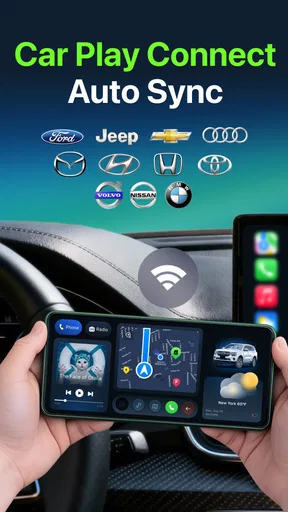
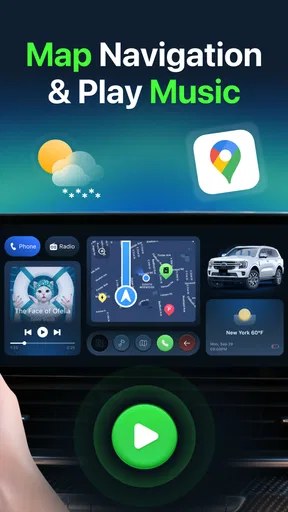
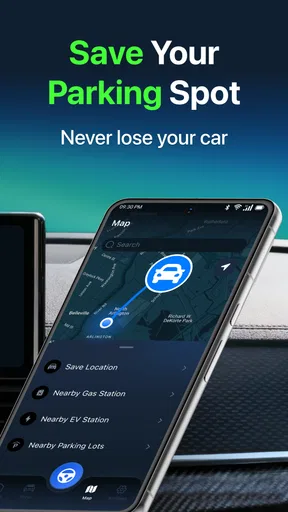
Our Review of Car Play Connect Auto Sync
 Analysis by Appyee
I judge a car companion app by a simple standard: does it make the start of a drive feel easier, without giving me another distracting screen to manage? Car Play Auto Sync For Android is aimed at that everyday need, pairing an Android phone with a car display so the driver can reach useful functions more conveniently. The idea is appealing, but I’d approach its promises with care: a phone app cannot make every vehicle’s equipment work the same way, and a smooth experience depends on the setup around it as well as the app itself.
It is a free Auto & Vehicles app from MONIQ TAP., CO LTD, with optional in-app purchases listed at $4.99 to $49.99 per item. Its average rating is 4.5 from around 1,400 ratings, and it has over 100,000 installs. Those figures suggest that plenty of people have tried it, but they don’t tell me whether it will suit a particular car. I’d make vehicle compatibility and the connection method the first things to consider before relying on it for a commute.
What the dashboard idea is good for
The main appeal is less about adding a new driving feature and more about making an existing phone-to-car routine feel organized. If you already use navigation or audio on your phone, bringing the experience onto a car display can reduce the temptation to pick up the handset to check what is happening. For me, that is the useful promise: a simpler place to glance at familiar tools, rather than a reason to keep interacting with a screen while moving.
Wireless syncing can also be convenient once it is set up. On a short trip, not having to reach for a cable may make the start less fussy; on a longer drive, an automatic connection could mean fewer repeated setup steps. The trade-off is that “wireless” does not automatically mean instant or dependable in every car. I’d test the connection while parked, then repeat the test on a few ordinary journeys before trusting it as part of my daily routine.
Check the car before planning around it
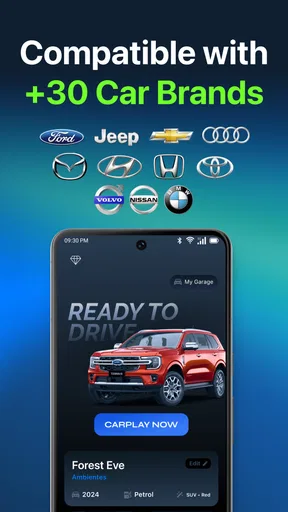
A phone app can only work within the capabilities of the phone and the vehicle display it is being paired with. Before installing, I’d check what the car already supports and how it normally connects to Android devices. If the built-in system already provides the layout and controls you want, adding another layer may not improve much. If the car’s screen does not support the kind of connection the app relies on, downloading it alone will not turn that screen into a compatible dashboard.
This is also where I would avoid assuming that every feature shown or described for a dashboard-style experience will behave identically across vehicles. Connection stability, screen proportions, and the controls available through a car can differ. A practical first test is to connect while stationary, make sure the display is readable from the driving position, and try the essential task you care about—such as starting navigation—before depending on it in traffic.
A more useful setup for daily driving
For a realistic weekday use case, imagine leaving home for work and wanting directions plus audio without handling the phone once the car is moving. I would pair the devices before setting off, choose the destination while parked, and start the audio I want before pulling away. That workflow matters more than customizing every visual detail: fewer steps at the curb mean less pressure to troubleshoot in a hurry and less reason to touch the screen later.
There is a small but important trade-off with automatic connection. It can save effort when the same phone and car are used regularly, but it may be less convenient if several people share the vehicle or if you sometimes want the car display to remain disconnected. In that case, I’d check how the app behaves when another phone is present and whether I can choose when to connect. Making that decision while parked is safer than sorting it out at the roadside.
How it compares with built-in and phone-only options
Compared with a car’s built-in system, an app-based dashboard may be attractive when you want to use your Android phone as the center of the experience rather than learn a separate interface. But a built-in system is often the simpler choice when it already connects reliably and gives you the controls you need. The app is not an automatic upgrade simply because it offers a phone-based route; it needs to solve a real annoyance in your current setup.
The phone-only alternative has its own advantage: it asks for no car-display connection at all. A mounted phone can be enough for someone who mainly needs directions and prefers a familiar, direct setup. The downside is that the screen remains separate from the vehicle’s display, and handling it can become tempting. I’d choose Car Play Auto Sync when the car connection works well and makes the dashboard easier to use, not just because wireless pairing sounds appealing.
One useful way to judge it is to keep the first trial narrow. Test the one or two activities you actually use in the car, rather than spending time configuring a dashboard for features you may never touch. If those essentials connect consistently and are easy to see, the app has earned a place in your routine. If the connection needs repeated attention or the display feels awkward, returning to the car’s native setup or a phone mount may be the more sensible choice.
Getting Started with Car Play Auto Sync
First things first, downloading and setting up Car Play Auto Sync For Android is a breeze. Head over to the Google Play Store, hit that download button, and you’re halfway there. Once installed, the app takes you through a simple setup process. Even if you’re not tech-savvy, the app’s user-friendly interface makes it a smooth ride.
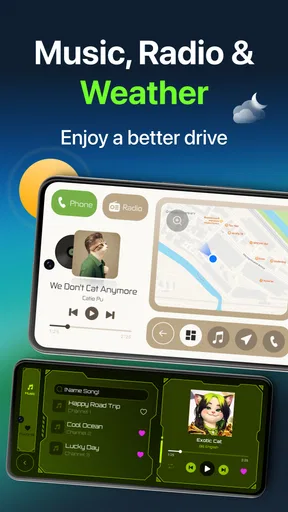
When I first launched the app, I was greeted with a clean and intuitive dashboard. You’ll find everything you need right at your fingertips, from navigation to music controls. It’s like having a co-pilot who doesn’t hog the aux cord!
Seamless Navigation Experience
Navigating through city traffic can be a headache, but with Car Play Auto Sync, it feels like having a personal GPS wizard. The app supports your favorite navigation apps, whether you’re loyal to Google Maps or a Waze aficionado. It mirrors these apps right onto your car’s display, making sure you keep your eyes on the road.
I tested it out on a weekend road trip and was impressed by how quickly it updated directions. The real-time traffic alerts were a lifesaver, helping me dodge a major traffic jam. If you’re someone who relies heavily on navigation, this feature alone makes the app worth it.
Music and Entertainment at Your Fingertips
If you’re anything like me, you know that a good playlist is essential for any drive. Car Play Auto Sync integrates smoothly with popular music apps, including Spotify and Apple Music. You can skip tracks, adjust volume, or switch playlists without taking your eyes off the road. It’s like having a personal DJ who knows exactly what you want to hear.
During my testing, I found the sound quality to be top-notch, and the app’s interface made it easy to browse through my extensive playlist. Whether you’re into podcasts or audiobooks, this app covers all bases.
Hands-Free Calling and Messaging
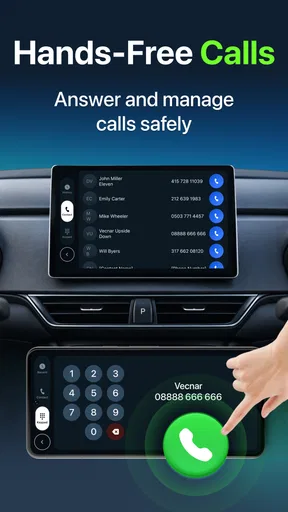
One of the standout features of Car Play Auto Sync is its hands-free calling and messaging capabilities. It syncs effortlessly with your contacts, allowing you to make calls or send messages with simple voice commands. This feature not only adds convenience but also enhances safety by keeping your hands on the wheel.
I tried it out with a few calls and found the voice recognition to be quite accurate. It picked up my commands even with some background noise, which was impressive. If you’re someone who likes to stay connected while on the go, this feature is a game-changer.
Customizable Interface
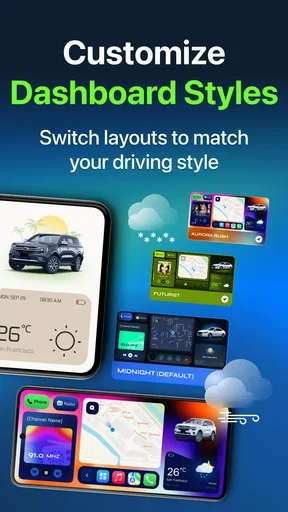
One of the things I love about Car Play Auto Sync is how customizable it is. You can tweak the interface to suit your preferences, from changing the theme to organizing app icons. It’s like having a dashboard that reflects your personality.
During my time with the app, I played around with different themes and layouts. I appreciated how easy it was to personalize, making my driving experience even more enjoyable.
What to expect before you install
The practical question is whether this is the right kind of app for your setup. It is designed for Android, has an Everyone content rating, and is currently at version 1.8, with Android 8.0 as the minimum operating-system requirement. I’d check that your phone meets that requirement and that you are installing the Android app on the device you intend to connect. It is not a substitute for checking your car’s own compatibility.
The app is free to install, but optional purchases range from $4.99 to $49.99 per item. I would start with the free experience and only consider a purchase if I clearly understand what it adds and know I will use it. The presence of in-app purchases does not mean you need to pay before deciding whether the basic connection fits your routine.
Released on January 9, 2026, it is a relatively new option, so I’d be especially deliberate about testing it rather than assuming it has already settled into every kind of car setup. The review total is smaller than the rating count, which is another reason I would treat the overall score as a broad impression rather than proof that every pairing works equally well. Check your own results: a stable connection and readable display matter more than a general average.
Who will get the most from it
I can see the strongest fit for an Android owner whose car has a compatible display, who regularly uses navigation or audio, and who wants fewer steps between getting in and setting off. It may also suit someone who dislikes repeatedly plugging in a phone, provided wireless pairing works reliably in their vehicle. The value is less compelling for a driver who already likes the car’s native interface or who rarely needs anything beyond a phone mounted in view.
I would skip it if your main goal is to add unsupported hardware capability to an older or incompatible display, or if you want a connection that requires no testing and no occasional troubleshooting. It is also not a reason to interact with a screen while driving. Set destinations, choose playlists, and resolve connection issues while parked; once on the road, keep attention on driving and use hands-free controls only when they are genuinely safe to do so.
Final Thoughts
Overall, Car Play Auto Sync For Android is a solid choice for anyone looking to enhance their driving experience. It brings all the functionality of an integrated car system right to your fingertips, without the hefty price tag. The seamless navigation, music integration, and hands-free features make it a must-have for Android users on the go.
Whether you’re commuting to work or embarking on a weekend getaway, this app ensures you stay connected while keeping your eyes on the road. So, if you haven’t checked it out yet, I’d say it’s worth a spin. Download it today, and hit the road with confidence!
My recommendation is more measured: try it if a wireless phone-to-car dashboard is a problem you actually want to solve, then judge it by how reliably it works with your own vehicle and everyday apps. The rating of 4.5 gives it an encouraging first impression, but your own parked setup test is the useful deciding point. If pairing is straightforward and the screen makes navigation or audio easier to manage, it can be a handy addition; if not, the built-in system or a phone-only setup may suit you better.
Privacy and Permissions
See what permissions an app requests and how it handles your data.
- Location
- approximate location (network-based), precise location (GPS and network-based)
- Wi-Fi connection information
- view Wi-Fi connections
- Other
- view network connections, full network access, prevent device from sleeping, Google Play license check
Verdict
Strengths of Car Play Connect Auto Sync
- Seamless integration with car systems.
- Supports various car models efficiently.
- User-friendly interface and setup.
- Consistent updates improve functionality.
- Offers offline navigation options.
Limitations of Car Play Connect Auto Sync
- Limited compatibility with older devices.
- Occasional connectivity drops.
- Requires stable internet for full features.
- Ads can be intrusive at times.
- Some features are premium-only.
Other Releases by MONIQ TAP., CO LTD
View All
OBD2 Car Scanner: Torque ELM
Auto & Vehicles4.1

Air Tag Detector: Find & Track
Tools4.5

Remote Control for Onn Roku TV
House & Home4.6
Similar Picks in This Category
View All
Android Auto
Google LLC4.1

maxim — order a taxi & food
PT. SITO4.7

Штрафы ГИБДД: проверка с фото
Pays LLC – Штрафы ГИБДД4.7

Номерограм – проверка авто
Авто Ассист4.8

Дром Авто
Дром4.9

Frequently Asked Questions
What is Car Play Auto Sync for Android?
Car Play Auto Sync for Android is an application designed to integrate your Android device seamlessly with your car's infotainment system. It aims to provide a smoother and more intuitive driving experience by syncing your phone's functions, such as navigation, music, and phone calls, directly to your car's display.
How does Car Play Auto Sync improve the driving experience?
The app enhances your driving experience by allowing you to access essential smartphone features without taking your eyes off the road. With voice control and easy-to-use interface, you can manage navigation, calls, and music hands-free, ensuring a safer and more convenient driving experience.
Is Car Play Auto Sync compatible with all Android devices?
Car Play Auto Sync is compatible with most Android devices running on recent versions of the Android OS. However, it's crucial to check the app's specifications and your car's compatibility requirements to ensure seamless integration and optimal performance.
Are there any subscription fees or in-app purchases?
Car Play Auto Sync may offer a free version with basic features and a premium version with additional functionalities. It's important to review any subscription fees or in-app purchases associated with the premium version to decide whether it meets your needs and budget.
What are the key features of Car Play Auto Sync?
Key features of Car Play Auto Sync include wireless connectivity, hands-free control via voice commands, and easy access to navigation, music, and communication apps. It also offers a user-friendly interface and seamless integration with your car's existing infotainment system, making it a valuable tool for daily commutes and road trips.
